
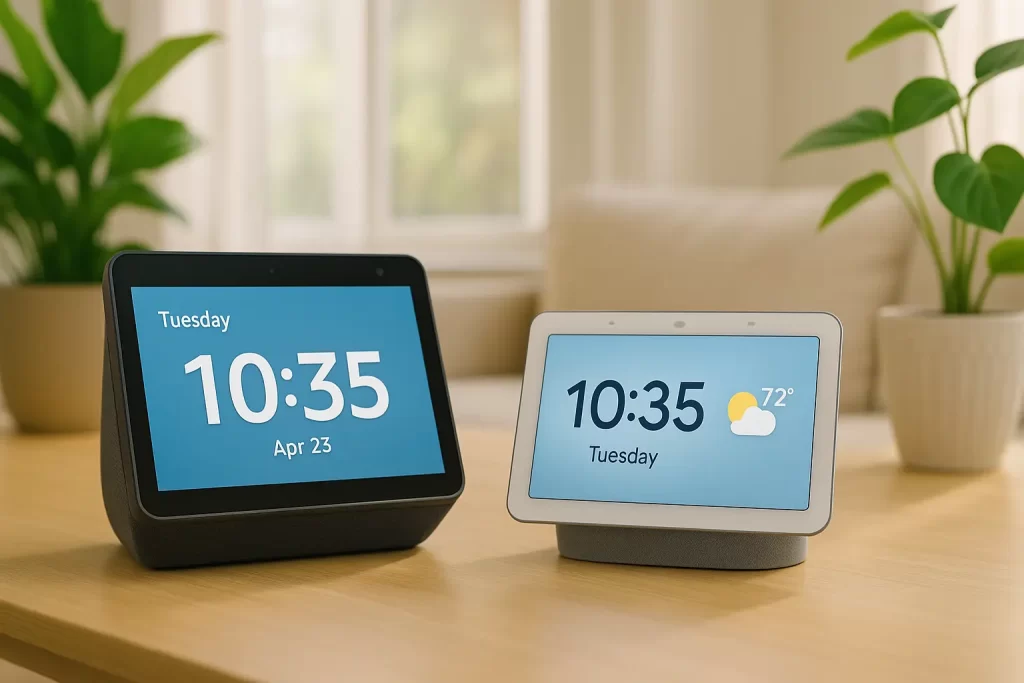
Choosing a smart speaker can feel confusing, especially if you are new to
voice assistants. This simple guide compares Amazon Echo and Google Home side by side to help
seniors choose the easiest and most comfortable smart speaker for daily use.
At Tech Assist For Seniors, I set up both systems for clients across Manatee
County and teach simple voice commands so technology feels friendly, not
frustrating.
What These Devices Do
Both Amazon Echo (Alexa) and Google Home (Google Assistant and Nest) can answer
questions, set reminders, control lights, play music, make calls, and display
information on screen models. The best choice depends on how you already use
technology and which features feel easiest to learn.
Amazon Echo vs Google Home for Seniors
Many seniors ask whether Amazon Echo or Google Home is better for everyday use.
Google Home can be a good option for older adults who already rely on Gmail,
Google Calendar, Google Photos, or frequent web searches. However, many seniors
find Amazon Echo easier for daily routines, reminders, and simple smart home
control.
Ease of Setup
Amazon Echo devices are quick to install using the Alexa app with clear
step-by-step instructions. Google Home setup is also straightforward, though it
often feels more familiar to those already using Google services. If you prefer
hands-on help, I offer in-home setup and training for both systems:
Voice Assistant Help in Lakewood Ranch
.
Voice Recognition and Accuracy
Both assistants understand natural speech well. Alexa often feels relaxed and
forgiving with short, routine commands. Google Assistant is especially strong
with questions involving directions, facts, and general knowledge. Seniors who
ask many “what,” “where,” or “how” questions may prefer Google, while Alexa works
very well for daily habits and home control.
Screen vs Speaker Options
Small speakers are ideal for timers, weather, and music. Smart displays such as
Echo Show and Nest Hub add large, easy-to-read screens for reminders, time,
weather, and photo slideshows. Seniors who appreciate visual cues and touch
buttons often prefer a display. If you are considering a screen model, see my
setup tips here:
Setting Up Echo Show for Elderly Parents
.
Calling and Video Calling
Both platforms support voice calling, and display models allow video calls with
family and friends. These features can reduce the need to use a phone. If your
family uses iPhones and FaceTime, I can also set up easy alternatives using
smart displays with simple tap-to-call or drop-in features. For broader device
comparisons, visit
Best Video Calling Devices for Seniors
.
Routines and Daily Reminders
Alexa routines are especially helpful for seniors. One simple phrase like
“good morning” can turn on lights, read the weather, and announce reminders such
as medications or appointments. These routines help build consistency and
reduce daily stress. Learn more here:
Alexa Routines for Elderly Care
.
Smart Home Compatibility
Both Amazon Echo and Google Home work with common smart bulbs, plugs,
thermostats, and doorbells. If home safety is important to you, see
How Smart Doorbells Improve Safety for Seniors
.
For accessibility-focused ideas, visit
Smart Home Accessibility for Aging Adults
.
Music, News, and Entertainment
Both devices stream music, podcasts, and radio. Alexa integrates smoothly with
Amazon Music and Audible audiobooks. Google Home works well with YouTube Music
and other Google services. Choosing the ecosystem you already use often feels
simpler and more comfortable.
Privacy and Safety
Both platforms include microphone mute buttons and adjustable privacy settings.
Alexa and Google allow you to review or delete voice recordings. During setup,
I help seniors limit features they do not need and explain privacy options in
plain language. Many people also prefer placing speakers outside bedrooms for
added peace of mind.
Cost and Models
Entry-level speakers are affordable, while display models cost more. Echo Show
devices often appear in bundle deals, and Nest Hub discounts are common during
holidays. For many seniors, a mid-size display offers the best balance of clear
text, good sound, and ease of use.
Which One Should You Choose?
For most seniors, the better choice comes down to simplicity versus search
accuracy. This guide focuses on choosing between Amazon Echo and Google Home,
not ranking the best individual speaker models.
- Choose Amazon Echo (Alexa) if you want easy routines, Audible audiobooks, and simple smart home control with many senior-focused guides already available on this site.
- Choose Google Home (Assistant and Nest) if you rely on Gmail, Google Calendar, Google Photos, or frequently ask detailed questions.
Local, Patient Setup Help
If you would like help choosing or setting up a device, I provide one-on-one,
in-home tech support across Manatee County. You can start here:
In-Home Tech Support for Seniors
.
For a broader overview, visit the
Smart Home and Entertainment for Seniors
pillar page.
Authoritative Resources
You can compare current models and accessibility features on the official
manufacturer pages:
Amazon Echo Devices
and Google Home (Nest) Devices